
How to Choose Music for Videos
Is YouTube Studio Useful?
YouTube Studio is like a Swiss army knife for content creators, from individuals to big companies. It’s where you can handle everything for your channel.
Think of it as your channel’s control center. You can upload, schedule, and improve your videos here. Plus, it’s got something called the Channel Dashboard, which is super handy. It shows you important stuff like how many subscribers you have, how many views your videos get, and how long people watch them.
If you’re part of the YouTube Partner Program, YouTube Studio helps you make money too. It shows you which parts of your videos earn the most cash.
In short, YouTube Studio isn’t just useful—it’s essential for anyone serious about making videos on YouTube.
Is YouTube Studio Free?
Absolutely! YouTube Studio is completely free of charge. You don’t need to spend a single penny to download it, own it, or use it. There are no hidden fees or subscriptions involved. The only requirement is that you have to create a YouTube account, which is also entirely free. So, rest assured, you can access all the powerful tools and features of YouTube Studio without opening your wallet.

Who Can Access YouTube Studio?
YouTube Studio is open to everyone with a YouTube account, no strings attached. You don’t need to hit any specific milestones like reaching a certain number of views or subscribers. Once you’re signed into your YouTube account, you’re good to go. This inclusive approach means that aspiring creators can explore the platform and get familiar with its features before diving into content creation.
How Do You Download the YouTube Studio App?
If you’re keen on managing your YouTube channel on the go, you’ll want to grab the official YouTube Studio app. It’s available for both Android and iOS devices, ensuring compatibility with a wide range of smartphones and tablets.
To get started, head over to your device’s app store—Google Play for Android users and the App Store for iPhone and iPad users. Once there, simply search for “YouTube Studio” and look for the official app developed by YouTube. Once you find it, tap the download button, and the app will start downloading and installing automatically.
Why Would I Download the App?
Wondering why you’d want the YouTube Studio app on your phone? Here’s why:
- Manage Anywhere: With the app, you can handle your channel from anywhere. Whether you’re out and about or just away from your computer, you can still keep things running smoothly.
- Easy Access: The app makes it super easy to do important stuff like upload videos, reply to comments, and check how your channel’s doing. No need to wait until you’re back at your computer.
- Stay Updated: Get instant alerts for things like new comments on your videos or changes in your channel’s stats. It helps you stay in the loop and respond quickly.
- Upload Instantly: See something cool or want to share a moment? You can record, edit, and upload videos right from your phone, wherever you are.
- Quick Edits: Need to tweak your videos? The app’s editing tools let you make fast changes like trimming footage or adding captions, all on your phone.
In a nutshell, having the YouTube Studio app means you can manage your channel on the go, stay connected with your audience, and create content whenever inspiration strikes, all from your phone.

How to add music in YouTube Studio?
Adding music in YouTube Studio is simple. Here is how:
- Log into YouTube and go to your YouTube Studio
- On the left side click on ‘Content’
- Hover over the video you want to edit, then click the ‘Pencil icon’
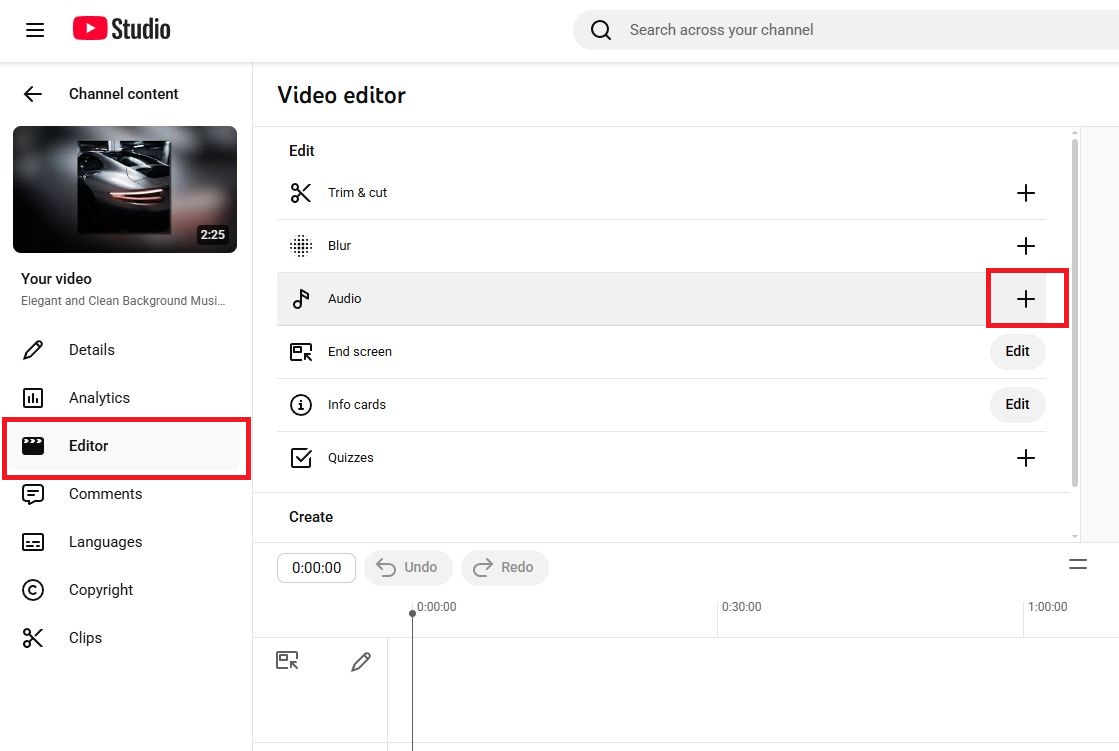
- In the left sidebar menu click on ‘Editor’. From here you can add a couple of different elements to your video and also music.
- On Audio click on the ‘plus icon’ on the right – as shown in the below image.
- Select the music track you want to use and add it to your video timeline. You can lower the volume of it, trim it so it starts and ends at different positions or move it within the timeline.
The YouTube Audio library is very limited and contains rather low quality audio material. If you are looking for high quality music for your videos, which you can also monetize, check out our royalty free music library here.
Can You Make YouTube Shorts With YouTube Studio?
Yes, you can make YouTube Shorts using YouTube Studio. Simply upload vertical videos that are less than 60 seconds long, and they will be eligible to appear in the Shorts shelf on the YouTube app. YouTube Studio provides all the necessary tools to edit and optimize your Shorts for maximum impact.
Stand out from the rest with professional audio
Looking to add that extra fire to your videos with music? This is where HookSounds comes in. With our extensive library of over 5000 original and exclusive royalty free music tracks, crafted in-house by our talented artists, you’ll find the perfect soundtrack to complement your content.
Compared to the Audio library built within YouTube Studio, you can benefit from our extended search filters, track suggestions and customized track versions to find your music quickly and integrate it into your videos like a professional.

